Most event research starts with a conference and asks, “Which companies will be there?” Reverse search flips the question: start with a target account and ask, “Where will this company show up next?” Scryon’s new Watch accounts feature answers that question from public conference rosters, then monitors the account for new appearances.
That shift matters because timing is often the difference between a planned meeting and a late “saw you at the show” message. The Salesforce State of Sales 2026 found that sellers spend almost one workday each week prospecting, while AI agents are expected to reduce prospect research time by 34%. The useful automation is not more generic outreach. It is earlier, more relevant context about accounts your team already cares about.
What reverse search means for event prospecting
Traditional event discovery is event-first:
- Choose a conference.
- Open its exhibitor, sponsor, or speaker list.
- Search the roster for accounts in your territory.
- Repeat the process for every other event.
Reverse search is account-first:
- Enter a company name or domain.
- Reveal the public conferences where that company is listed.
- Review the date, location, booth information, and type of presence when available.
- Monitor the company so future roster appearances come to you.
This is useful for named-account sales, account-based marketing, partnerships, customer expansion, and competitive intelligence. Instead of asking a rep to check ten event websites every week, the team can maintain one watchlist around the companies that matter.
The feature complements a broader target account list for events. Your ICP and territory rules decide which accounts deserve attention. Reverse search shows where those accounts may be available for an in-person conversation.
How Scryon Watch accounts works
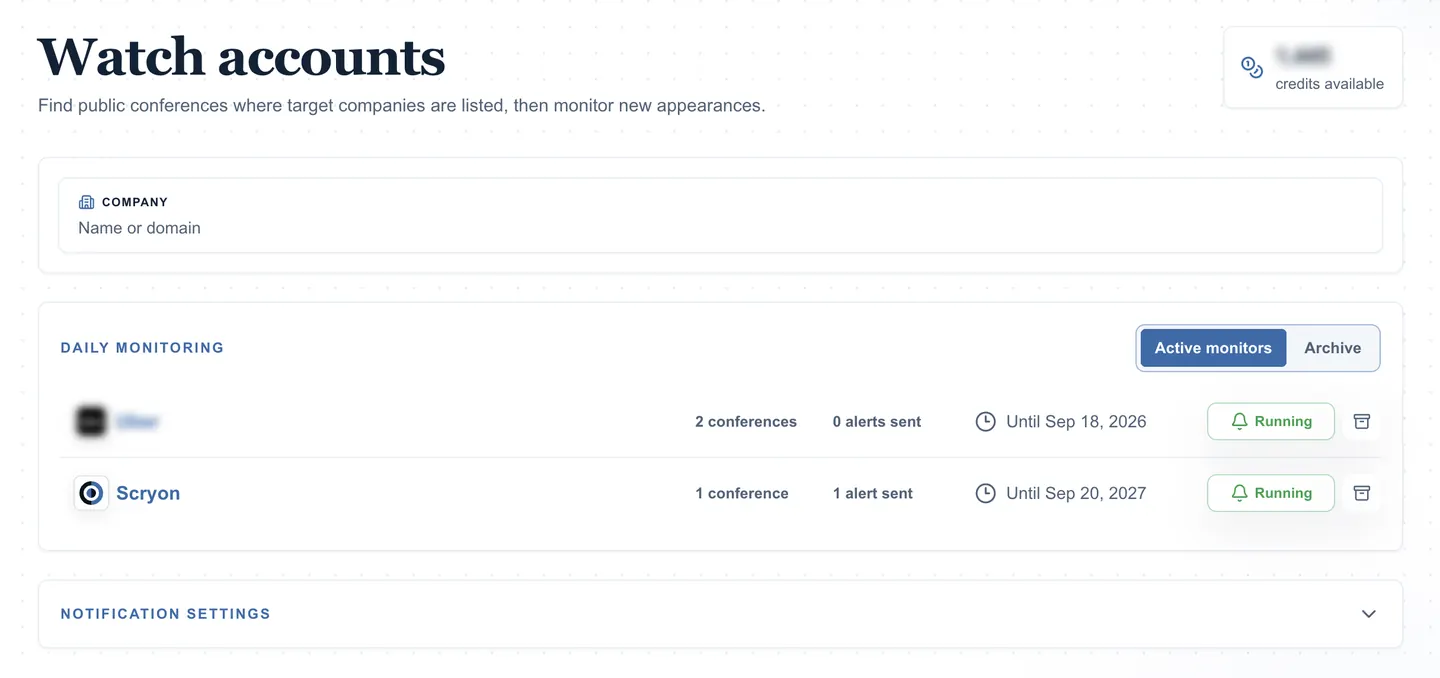
Open Watch accounts and search for a company by name or domain. Scryon suggests matching companies so you can select the correct account before spending credits. A reveal costs 5 credits only when Scryon finds conference matches. Searches with no matches are free.
The result is a company-level view of public conference appearances. Each match can include:
- Conference name and dates
- Location
- Booth number
- Presence type, such as exhibitor, sponsor, or speaker
- A direct route to the conference page and its unlock options
These are public roster listings, not independent confirmation that a specific employee will attend. Treat each match as an account-level planning signal and verify the people involved before outreach.
For example, a seller targeting telecom, cloud, infrastructure, or enterprise technology accounts could reverse-search companies that attend MWC Barcelona 2026, then inspect other public events where those same accounts appear. That creates an account itinerary rather than a single-show list.
If the company is not in Scryon yet, submit its name and website for review. Approved companies become searchable without requiring the user to guess at alternate spellings or duplicate records.
Turn a one-time search into an account monitor
A reveal answers what is known now. A monitor keeps the answer current.
After selecting a company, choose a 30-day, 90-day, or one-year monitoring term. Monitoring includes the current search results and checks for new public conference listings. Current pricing is:
- 20 credits for 30 days
- 50 credits for 90 days
- 150 credits for one year
When a monitored company appears on a new public roster, Scryon queues the match for a digest. Email delivery can be enabled directly. Teams can also use an incoming webhook for Slack, Discord, Microsoft Teams, Zapier, Make, n8n, or a custom HTTPS endpoint.
The digest is designed to control noise. If at least one new match is due, Scryon sends one digest at most every six hours across watched companies, rather than one alert for every listing. A team can pause alerts for an individual account, archive monitors that are no longer active, and extend a term when the account remains important.
A practical Watch accounts workflow
Start with a short list, not every company in the CRM.
1. Pick accounts with a clear reason to watch
Good candidates include open opportunities, strategic prospects, customers with expansion potential, partners, and competitors. Add an owner and a reason such as “book executive meeting,” “protect renewal,” or “track sponsorship activity.”
2. Reveal the current event footprint
Review the known conferences before turning on monitoring. Separate upcoming events from past appearances and note recurring patterns. An account that returns to the same flagship event every year deserves a different outreach plan from one testing a new vertical show.
3. Choose a term that matches the sales window
Use 30 days for a near-term campaign, 90 days for a quarter, and one year for strategic accounts or competitors. The term should reflect how long the account will remain a priority, not how long a rep happens to remember it.
4. Route alerts into an owned action
An alert is only useful if somebody acts on it. Send the digest to the channel your team already works from, assign the account owner, and define the next step: inspect the conference, map likely attendees, or start pre-event outreach.
The 6sense 2025 Buyer Experience Report found that 95% of winning vendors were already on the buyer’s Day One shortlist. An event appearance is not proof that an account is buying, but it creates a timely opportunity to build familiarity before a formal sales conversation begins.
5. Keep fit separate from the signal
Conference presence is a timing signal, not a qualification model. Pair it with ICP fit scoring and CRM context. A low-fit company does not become a priority merely because it appears at many shows. A high-fit account at the right event, however, can justify fast, personalized action.
Search from the account, not only the event
Event-first discovery still matters when you are deciding which shows to attend. Reverse search solves the other half of the problem: finding the event path of an account you already want to meet. Together, the two views help sales and marketing teams plan around account fit, event timing, and a real reason to reach out.